
Express YourCELf: Filtering and Validating Secrets with CEL
How Betterleaks replaces TOML allowlists with CEL expressions for filtering and validation


I’ve spent the last several years working on secret detection as the author and maintainer of Gitleaks. Gitleaks showed that regex, entropy, and rule-based filtering are useful foundations for finding candidate secrets, but it also showed where that model becomes difficult to extend.
Filtering in Gitleaks was handled through allowlists, which are just TOML tables that tell the scanner when to ignore a finding. They worked for common cases like ignoring test fixtures, example values, or known false positives, but they became awkward as the logic became more specific. Paths, regexes, stopwords, match targets, and conditions were all modeled as separate TOML fields, which made more nuanced filtering possible but not especially pleasant.
Gitleaks also stops at detection and filtering. It does not provide a general validation system. Once a candidate secret is found, there is no built-in way to ask the provider whether that credential is still usable. Validation often requires provider-specific behavior via HTTP requests, signed payloads, timestamps, custom headers, and response parsing.
Betterleaks is my attempt to take what worked in Gitleaks and clean up the parts that got awkward over time. For validation and filtering, that meant moving some of the logic out of fixed TOML fields and into CEL, Google’s Common Expression Language.
What is CEL
CEL is a small expression language designed to be embedded inside larger applications. It gives users a constrained way to express conditions against data the application provides. There are some widely used projects already using CEL like Kubernetes, Envoy, and gRPC.
Below is a CEL expression from the kubernetes docs validating that two sets are disjoint.
self.set1.all(e, !(e in self.set2))Betterleaks uses CEL as a way to extend the declarative TOML config that defines rules, regexes, keywords, identifiers, and other static configuration. CEL handles the parts of a rule that need more expressive logic like deciding whether a resource should be scanned, deciding whether a candidate finding should be ignored, or making a validation request and interpreting the response.
If you go to the cel.dev website you’ll see the question “Is CEL right for your project”. It goes on to state, “CEL is ideal for performance-critical applications because it was designed to evaluate safely and quickly (nanoseconds to microseconds) with predictable costs. CEL expressions are especially useful for predicate logic and simple data transformations. CEL is used most efficiently in applications where expressions are evaluated frequently, but modified infrequently.” This description matches the shape of how Betterleaks approaches secrets scanning. In Betterleaks, expressions are compiled once when needed, then evaluated repeatedly across resources and candidate findings during the filtering and validation stages of a scan.
Validation with CEL
In release v1.1.0 we introduced a change that lets you wire up validation logic in CEL. A Betterleaks validator returns one of 6 outcomes: valid, needs validation, invalid, revoked, error, or unknown. Valid means the credential worked. Needs validation means validation wasn’t attempted but there is ample evidence for manual validation. Invalid means the provider rejected it in a way we understand. Revoked means the provider recognized the credential, but indicated that it can no longer be used. Error means an error occurred during evaluation. Unknown means Betterleaks could not safely classify the result.
Now let’s look at some examples.
Below is a CEL expression for validating a GitHub App token. Note that it’s a tad simplified for demonstration purposes.
cel.bind(r,
  http.get("https://api.github.com/app", {
    "Authorization": "Bearer " + finding["secret"]
  }),
  r.status == 200 ? {
    "result": "valid"
  } : r.status in [401, 403] ? {
    "result": "invalid",
    "reason": "Unauthorized"
  } : unknown(r)
)
cel.bind is a macro used to assign an intermediate value. In this case, the response from GitHub is bound to r, and the rest of the expression classifies the credential based on the response status. A 200 response produces a valid result. A 401 or 403 response produces an invalid result. Anything else produces an unknown result.
Some providers require more than a bearer token in a single request. Some validation flows depend on timestamps, secondary captured values, derived headers, or cryptographic signatures. CEL lets us express that request construction and response classification without adding provider-specific fields to the TOML schema.
cel.bind(ts, time.now_unix(),
  cel.bind(sig,
    crypto.hmac_sha256(
      base64.decode(captures["polymarket-api-secret"]),
      bytes(ts + "GET" + "/data/orders")
    ),
    cel.bind(r,
      http.get("https://clob.polymarket.com/data/orders", {
        "POLY_BUILDER_API_KEY": finding["secret"],
        "POLY_BUILDER_PASSPHRASE": captures["polymarket-passphrase"],
        "POLY_BUILDER_TIMESTAMP": ts,
        "POLY_BUILDER_SIGNATURE": base64.encode(sig).replace("+", "-").replace("/", "_")
      }),
      r.status == 200 ? {
        "result": "valid"
      } : r.status in [401, 403] ? {
        "result": "invalid",
        "reason": "Unauthorized"
      } : unknown(r)
    )
  )
)
This validator for Polymarket uses values captured by other rules (polymarket-api-secret, polymarket-passphrase), computes a timestamped HMAC signature, sends the validation request, then classifies the response.
CEL also supports application-specific functions. Betterleaks exposes general-purpose helpers such as crypto.hmac_sha256, but some providers are better handled with a dedicated function. AWS validation is a good example because the request requires SigV4 signing, which is useful behavior to centralize rather than repeat in every rule.
cel.bind(r,
  aws.validate(finding["secret"], captures["aws-secret-access-key"]),
  r.status == 200 ? {
    "result": "valid",
    "arn": r.arn,
    "account": r.account,
    "userid": r.userid
  } : r.status == 403 && r.error_code == "ExpiredToken" ? {
    "result": "revoked",
    "error_code": r.error_code,
    "error_message": r.error_message
  } : r.status == 403 ? {
    "result": "invalid",
    "error_code": r.error_code,
    "error_message": r.error_message
  } : unknown(r)
)
aws.validate does the provider-specific work: it builds a SigV4-signed request to STS (Security Token Service) GetCallerIdentity and returns the response as a CEL value. The expression still controls how that response is interpreted. On success, it can return AWS identity metadata such as ARN, account, and user ID.
Filtering with CEL
Secret scanners excel at finding secrets in source code. They use a combination of regular expressions, entropy-based searches and other heuristics. That body of work is well defined and easy to implement. The challenge is taking a huge list of candidate secrets and distilling it down into a manageable size list of findings to review.
When I wrote Gitleaks, we used an allowlist to filter out obvious false positives, like secrets with the word ‘EXAMPLE’ in them. But this felt super clunky. Take a look at Gitleaks’ allowlist for generic secrets below:
[[rules.allowlists]]
regexes = [
    '''^[a-zA-Z_.-]+$''',
]
[[rules.allowlists]]
description = "Allowlist for Generic API Keys"
regexTarget = "match"
regexes = [
    '''(?i)(?:access(?:ibility|or)|access[_.-]?id|random[_.-]?access|api[_.-]?(?:id|name|version)|rapid|capital|[a-z0-9-]*?...''',
]
stopwords = [
    "000000",
    "6fe4476ee5a1832882e326b506d14126",
    "_ec2_",
    …
]
There are a few things happening here. The first allowlist checks the captured secret against a regex and suppresses values that look like ordinary words or identifiers. The second allowlist changes the target to the full match, checks that match against another set of regexes, and also suppresses findings when the captured secret contains one of several stopwords. None of that logic is especially complicated, but it is spread across several TOML fields with behavior that depends on field names like regexTarget, regexes, and stopwords. As these cases accumulate, the configuration starts to feel less like a rule and more like a small filtering language implemented through TOML tables.
CEL makes that filtering logic explicit. Instead of encoding the decision across multiple allowlist fields, the rule can express the condition directly as a boolean expression. If the expression returns true, Betterleaks drops the finding. The same example translated to CEL looks like this:`
matchesAny(finding["secret"], ["^[a-zA-Z_.-]+$"]) ||
(matchesAny(finding["match"],[r"""(?i)(?:access(?:ibility|or)|access[_.-]?id|random[_.-]?access|api[_.-]?(?:id|name|version)|rapid|capital|[a-z0-9-]*?"""]) || containsAny(finding["secret"],
["000000",
 "6fe4476ee5a1832882e326b506d14126",
 "_ec2_"]))
We use matchesAny instead of the built-in CEL matches function. matchesAny is a custom function that compiles all the patterns from a list into one regex and uses whichever regex engine betterleaks is configured to use (stdlib or re2).
Filters and Prefilters
There are two kinds of filters in Betterleaks, prefilters and filters. Prefilters run during resource enumeration and let you bail out early before hitting potentially expensive regex operations. Prefilters have access to resource metadata (we call this metadata, Attributes). Filters have access to resource metadata like prefilters, but also have access to candidate finding data. Betterleaks configs carry one top-level prefilter that applies to every fragment, one top-level filter that applies to all candidate findings, and rule-level filters that apply filters to only the candidates triggered by that rule.
Prefilters
A good example of a prefilter would be skipping image files, or dependabot commits:
matchesAny(attributes[?"path"].orValue(""),
 [r"""(?i)\.(?:bmp|gif|jpe?g|png|svg|tiff?)$""",
  r"""(?i)\.(?:eot|[ot]tf|woff2?)$""", …]) ||
attributes[?"git.author_email"].orValue("").contains("dependabot[bot]")
Or say we wanted to exclude scanning release notes and artifacts from all v1.x.x releases in a repo called “sillyrepo”. We could wire up a top level prefilter to look like this:
attributes[?"github.repo"].orValue("") == "sillyrepo" &&
  attributes[?"github.release.tag"].orValue("").contains("v1.")
Filters
Filters runs after a regex match and sees both the resource metadata (attributes) and the candidate finding itself. Filters can be placed at the top level (apply this filter to every candidate) or at the rule level (apply this filter only against candidates w/ matching this rule). This is where you can express things like “if this fails the TokenEfficiency test and was committed before June 2nd 2025, ignore this finding”.
failsTokenEfficiency(finding["secret"]) &&
  attributes[?"git.date"].orValue("") < "2025-06-02T00:00:00Z"
Most rule level filters are entropy and token efficiency checks:
entropy(finding["secret"]) <= 3.5
|| failsTokenEfficiency(finding["secret"])
Putting It Together
The overall model is fairly simple. TOML defines the rule, and CEL extends the rule where validation or filtering logic is needed.
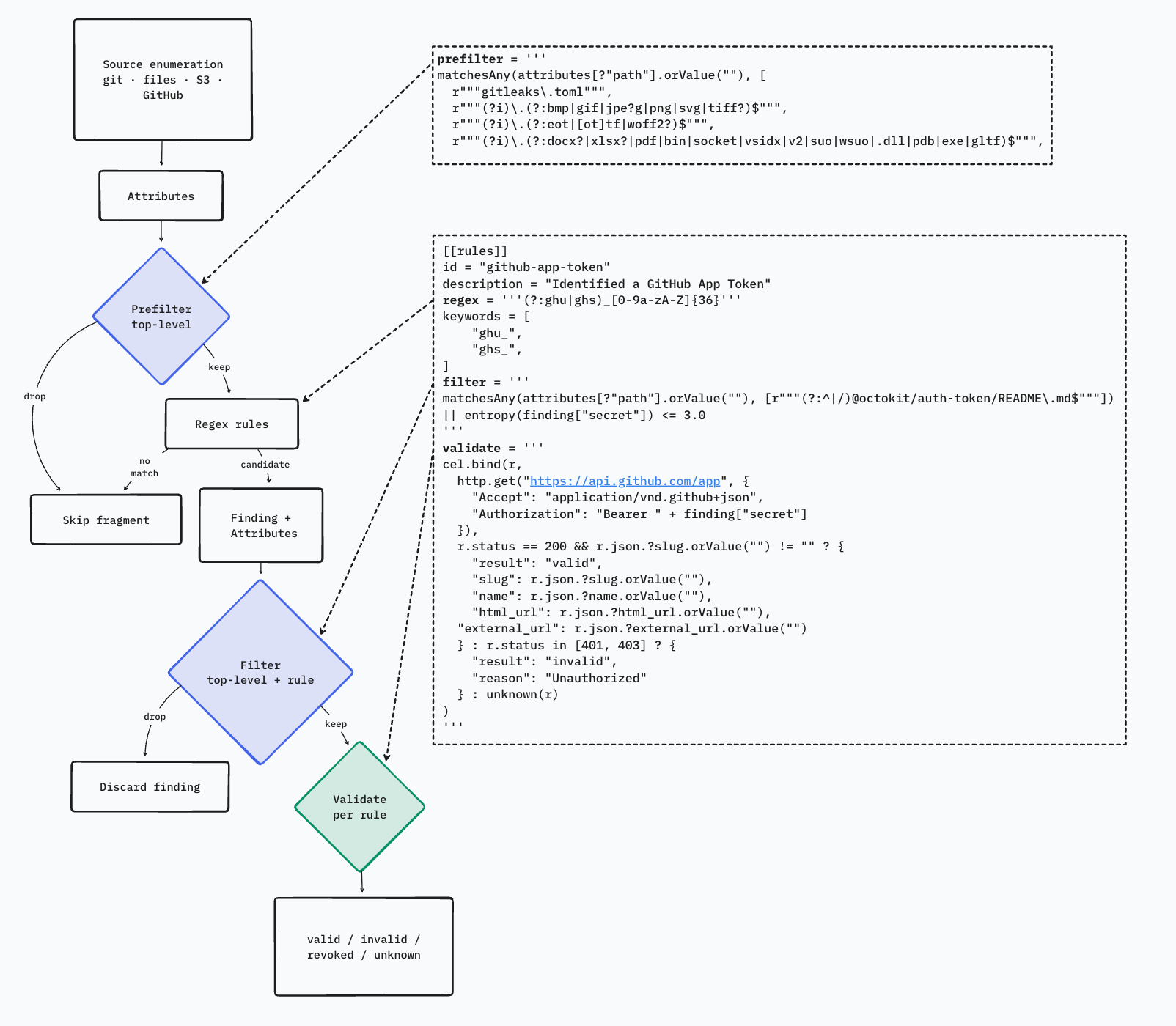
In Betterleaks, CEL is used to express provider-specific validation behavior, metadata-based prefilters, and finding-level suppression logic. This replaces several implicit configuration patterns with explicit boolean and structured expressions. But don’t worry, your Gitleaks configs with allowlists will work just fine with Betterleaks. There’s a translation layer that translates allowlists to CEL filters.